
By Bob Sorokanich, senior editor, GM News
By Bob Sorokanich, senior editor, GM News
The modern automobile is as much a digital device as a mechanical machine. So when General Motors set out to design an entirely new vehicle user interface, the process began with three principles: Make it simple, make it fast, make it predictable.
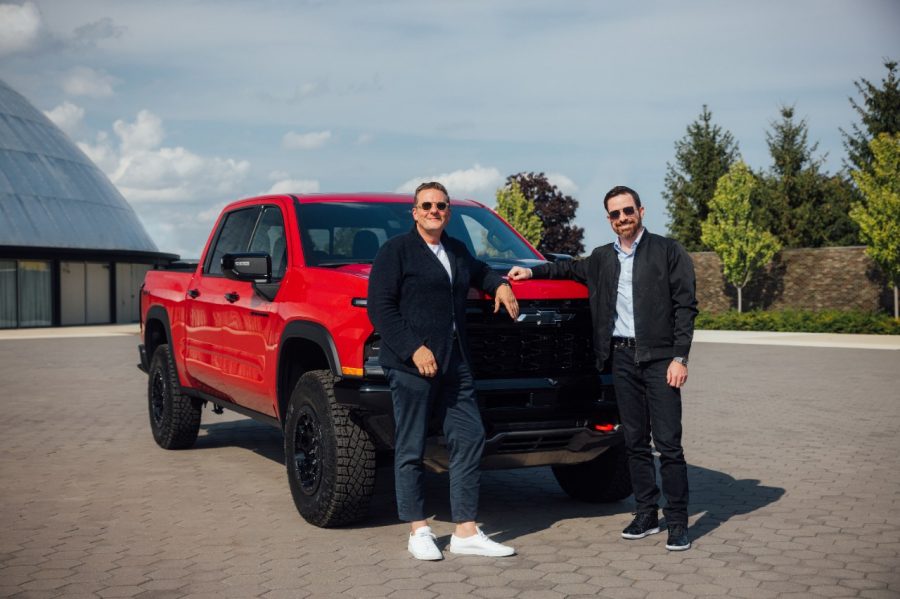
GM’s new user interface debuts on the redesigned 2027 Chevrolet Silverado and GMC Sierra light-duty pickup trucks. GM News sat down with Executive Director of Software Product Management Michael Wahlstrom and Executive Director of Human Interface Design Sebastian Bauer to learn more about the all-new UI architecture coming to the next generation of GM pickup trucks.
What trends are shaping the way GM thinks about the in-vehicle experience?
Sebastian Bauer: Vehicles are becoming more capable, more personal, and customer expectations are evolving. People expect the same consistency in their vehicles as they expect with their personal mobile devices. For us, that presented a clear opportunity, and frankly a responsibility. As technology continues to evolve, we wanted to help customers get more out of their vehicle while keeping the experience intuitive and approachable.
GM has a long history of pushing design forward. In the past, that applied primarily to the metal, but now it also applies to software. Our new UI is built on a foundation of human-centered design that makes interactions simpler, faster and more predictable, and allows the experience to improve over time through over-the-air updates.
Why start with GM’s light-duty pickups?
Mike Wahlstrom: Our light-duty pickups are our highest-volume vehicles, which allows us to bring this new UI to a lot of customers quickly. There’s also another reason. Historically, the truck market wasn’t as influenced by new user interface designs. That’s changing. Infotainment ranks among the top three purchase drivers for new car buyers1 and we’ve seen truck customers become increasingly interested in screens, software and the overall in-vehicle experience. With the latest generation of trucks, that market has really started to focus on the UI as an important part of the ownership experience. That’s why launching our new vehicle experience in our trucks feels like such an important moment for us.
We’ve built this new UI framework as a scalable design system and software platform. Using common components across the GM portfolio becomes a major enabler in the future because it allows us to focus on building new features and experiences and spend less time redeploying the same UI to each unique screen configuration.
How do you create a consistent experience across GM’s portfolio while preserving each vehicle’s personality?
Sebastian Bauer: Customers should see a consistent GM foundation across our vehicles, but not an identical experience. The core interaction patterns — how customers navigate, use controls and complete everyday tasks — should feel familiar and predictable regardless of what GM vehicle you’re driving. On top of that foundation, each brand and vehicle type should express its own character and personality.
Pickups emphasize towing, trailering and off-road capabilities. Luxury vehicles place greater emphasis on calmness, refinement and personalization. Performance vehicles prioritize drive modes, performance data and more dynamic visual expression tailored to spirited driving or track use.
What customer feedback most influenced the design of the new UI?
Mike Wahlstrom: There are really two categories of feedback. The first is understanding what’s happening in the field today — what’s difficult to use, what’s confusing and how customers interact with current systems. The second is ongoing usability studies throughout development, where we’re continuously evaluating and improving the experience.
A major objective is making things simpler to eliminate confusion. There is always a balance between customization and optionality versus simplicity and intuitiveness. We’re constantly working to strike that balance. This next-gen UI will also be our most instrumented platform, and we’ll continue updating it through OTAs to address ongoing customer feedback.
Sebastian Bauer: We focus on where technology creates friction in everyday driving. What we heard was that people were hunting for controls, navigating through too many steps, and encountering interaction models that felt inconsistent. We used those insights to simplify the experience.
We focused on fewer taps; clearer visual, auditory and haptic feedback; more consistent interaction patterns; and better alignment between controls and outcomes. We wanted to keep frequently used controls, like climate or camera views, as quick access functions where customers expect them, while using a shared design language to make the experience easier to understand across displays, vehicles and brands. Importantly, feedback isn’t something we collect at the end. It’s part of an ongoing cycle of research, vehicle evaluation and software improvement.
How does the Apple CarPlay and Android Auto experience in trucks evolve with the new UI?
Mike Wahlstrom: We were one of the first automakers to bring Apple CarPlay and Android Auto™ into our gas-powered vehicles. Now with the new UI, we’ve integrated the experience more deeply than ever before in our light-duty pickups. People really like CarPlay and Android Auto because they’re so user-centric. We heard from customers that they want that same simplicity while still having quick access to everything their vehicle can do. Our next-gen UI brings those together in a cohesive way.
As we evolve our UI systems, we want customers to feel like they’re interacting with a single experience rather than moving from room to room inside a house. It’s more of a curation of experiences, and it removes the mental load for a driver to decide where to go next, which experience to use next. It’s much more intuitive and clean.
How do you decide whether to put a feature under a physical button or on the touchscreen
Mike Wahlstrom: We start by understanding customer expectations for a particular vehicle. Luxury vehicles, pickups, SUVs and performance vehicles may all have different needs. As we work through core experiences, we decide where customers need quick access to a control and where a physical button makes sense.
Sebastian Bauer: For me, it starts with intentionality. There are certain functions where safety, muscle memory and quick access matter. Some of those functions can be well implemented through touchscreen controls, while others are more intuitive with physical controls, which provide tactile feedback that customers can access instinctively without looking. It’s about creating confidence. Confidence builds trust — trust in your own capabilities as a driver, trust in the vehicle and trust in the brand.
What’s the first thing you want customers to notice about the new UI?
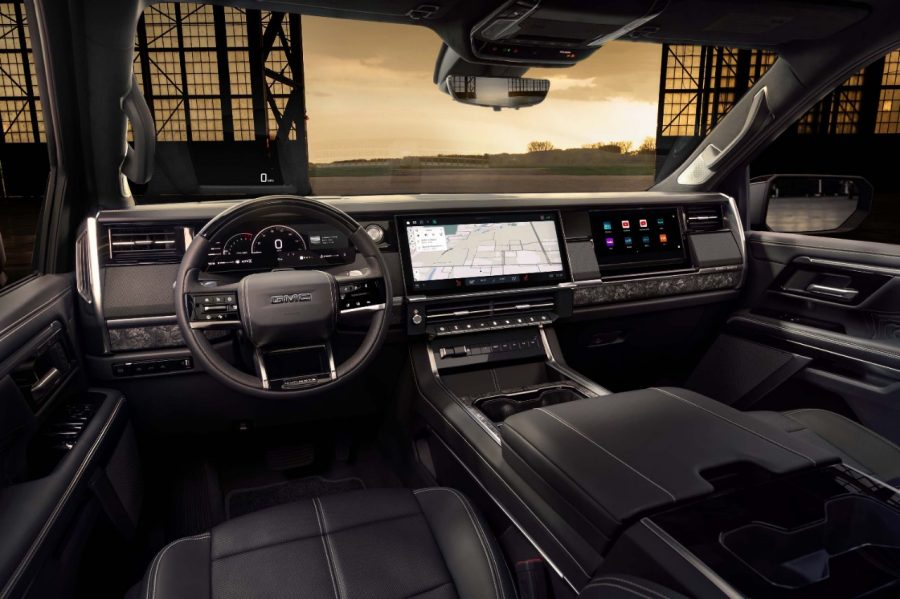
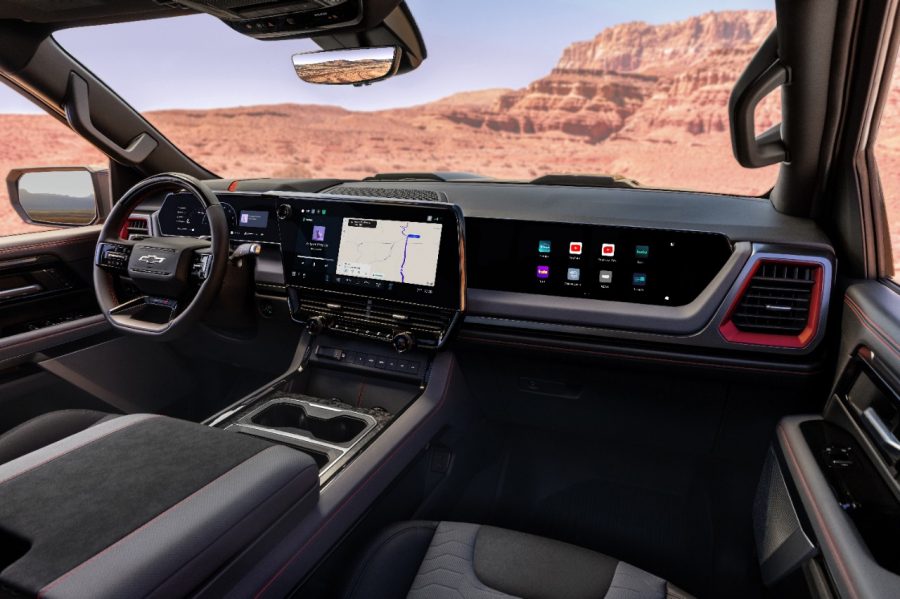
Mike Wahlstrom: The first thing customers will notice is how modern and visually striking the UI feels. The physical screens are gorgeous. The 60 inches of display across the vehicle, with new local backlight dimming, deliver a lot of rich, useful content without feeling overwhelming. We spent a long time looking at customer data and made changes that we think really reflect what customers want.
The fully interactive home screen is where we expect most people to live. It provides everything you need on a day-to-day basis. You’re able to change audio sources, move the map, zoom in or zoom out on your GPS route, all from the home screen.
Sebastian Bauer: I hope customers will immediately notice the clarity through a cleaner visual system that’s much easier to understand at a glance. The interaction patterns are more consistent, and the core tasks require fewer steps. It’s that notion of technology fading into the background and allowing customers to accomplish what they need to do with a lot less cognitive effort and fewer distractions.
1 Source: 2025 US Ipsos NVCS (Oct '24-Jun ‘25)
Android Auto is a trademark of Google LLC. Compatible Android phone and compatible active data plan required.
The modern automobile is as much a digital device as a mechanical machine. So when General Motors set out to design an entirely new vehicle user interface, the process began with three principles: Make it simple, make it fast, make it predictable.
GM’s new user interface debuts on the redesigned 2027 Chevrolet Silverado and GMC Sierra light-duty pickup trucks. GM News sat down with Executive Director of Software Product Management Michael Wahlstrom and Executive Director of Human Interface Design Sebastian Bauer to learn more about the all-new UI architecture coming to the next generation of GM pickup trucks.
What trends are shaping the way GM thinks about the in-vehicle experience?
Sebastian Bauer: Vehicles are becoming more capable, more personal, and customer expectations are evolving. People expect the same consistency in their vehicles as they expect with their personal mobile devices. For us, that presented a clear opportunity, and frankly a responsibility. As technology continues to evolve, we wanted to help customers get more out of their vehicle while keeping the experience intuitive and approachable.
GM has a long history of pushing design forward. In the past, that applied primarily to the metal, but now it also applies to software. Our new UI is built on a foundation of human-centered design that makes interactions simpler, faster and more predictable, and allows the experience to improve over time through over-the-air updates.
Why start with GM’s light-duty pickups?
Mike Wahlstrom: Our light-duty pickups are our highest-volume vehicles, which allows us to bring this new UI to a lot of customers quickly. There’s also another reason. Historically, the truck market wasn’t as influenced by new user interface designs. That’s changing. Infotainment ranks among the top three purchase drivers for new car buyers1 and we’ve seen truck customers become increasingly interested in screens, software and the overall in-vehicle experience. With the latest generation of trucks, that market has really started to focus on the UI as an important part of the ownership experience. That’s why launching our new vehicle experience in our trucks feels like such an important moment for us.
We’ve built this new UI framework as a scalable design system and software platform. Using common components across the GM portfolio becomes a major enabler in the future because it allows us to focus on building new features and experiences and spend less time redeploying the same UI to each unique screen configuration.
How do you create a consistent experience across GM’s portfolio while preserving each vehicle’s personality?
Sebastian Bauer: Customers should see a consistent GM foundation across our vehicles, but not an identical experience. The core interaction patterns — how customers navigate, use controls and complete everyday tasks — should feel familiar and predictable regardless of what GM vehicle you’re driving. On top of that foundation, each brand and vehicle type should express its own character and personality.
Pickups emphasize towing, trailering and off-road capabilities. Luxury vehicles place greater emphasis on calmness, refinement and personalization. Performance vehicles prioritize drive modes, performance data and more dynamic visual expression tailored to spirited driving or track use.
What customer feedback most influenced the design of the new UI?
Mike Wahlstrom: There are really two categories of feedback. The first is understanding what’s happening in the field today — what’s difficult to use, what’s confusing and how customers interact with current systems. The second is ongoing usability studies throughout development, where we’re continuously evaluating and improving the experience.
A major objective is making things simpler to eliminate confusion. There is always a balance between customization and optionality versus simplicity and intuitiveness. We’re constantly working to strike that balance. This next-gen UI will also be our most instrumented platform, and we’ll continue updating it through OTAs to address ongoing customer feedback.
Sebastian Bauer: We focus on where technology creates friction in everyday driving. What we heard was that people were hunting for controls, navigating through too many steps, and encountering interaction models that felt inconsistent. We used those insights to simplify the experience.
We focused on fewer taps; clearer visual, auditory and haptic feedback; more consistent interaction patterns; and better alignment between controls and outcomes. We wanted to keep frequently used controls, like climate or camera views, as quick access functions where customers expect them, while using a shared design language to make the experience easier to understand across displays, vehicles and brands. Importantly, feedback isn’t something we collect at the end. It’s part of an ongoing cycle of research, vehicle evaluation and software improvement.
How does the Apple CarPlay and Android Auto experience in trucks evolve with the new UI?
Mike Wahlstrom: We were one of the first automakers to bring Apple CarPlay and Android Auto™ into our gas-powered vehicles. Now with the new UI, we’ve integrated the experience more deeply than ever before in our light-duty pickups. People really like CarPlay and Android Auto because they’re so user-centric. We heard from customers that they want that same simplicity while still having quick access to everything their vehicle can do. Our next-gen UI brings those together in a cohesive way.
As we evolve our UI systems, we want customers to feel like they’re interacting with a single experience rather than moving from room to room inside a house. It’s more of a curation of experiences, and it removes the mental load for a driver to decide where to go next, which experience to use next. It’s much more intuitive and clean.
How do you decide whether to put a feature under a physical button or on the touchscreen?
Mike Wahlstrom: We start by understanding customer expectations for a particular vehicle. Luxury vehicles, pickups, SUVs and performance vehicles may all have different needs. As we work through core experiences, we decide where customers need quick access to a control and where a physical button makes sense.
Sebastian Bauer: For me, it starts with intentionality. There are certain functions where safety, muscle memory and quick access matter. Some of those functions can be well implemented through touchscreen controls, while others are more intuitive with physical controls, which provide tactile feedback that customers can access instinctively without looking. It’s about creating confidence. Confidence builds trust — trust in your own capabilities as a driver, trust in the vehicle and trust in the brand.
What’s the first thing you want customers to notice about the new UI?
Mike Wahlstrom: The first thing customers will notice is how modern and visually striking the UI feels. The physical screens are gorgeous. The 60 inches of display across the vehicle, with new local backlight dimming, deliver a lot of rich, useful content without feeling overwhelming. We spent a long time looking at customer data and made changes that we think really reflect what customers want.
The fully interactive home screen is where we expect most people to live. It provides everything you need on a day-to-day basis. You’re able to change audio sources, move the map, zoom in or zoom out on your GPS route, all from the home screen.
Sebastian Bauer: I hope customers will immediately notice the clarity through a cleaner visual system that’s much easier to understand at a glance. The interaction patterns are more consistent, and the core tasks require fewer steps. It’s that notion of technology fading into the background and allowing customers to accomplish what they need to do with a lot less cognitive effort and fewer distractions.
1 Source: 2025 US Ipsos NVCS (Oct '24-Jun ‘25)
Android Auto is a trademark of Google LLC. Compatible Android phone and compatible active data plan required.