New software updates enhance GM’s infotainment experience
2026-07-29
GM’s latest software updates introduce a series of enhancements to Cadillac’s freeform user interface. Shaped by customer feedback, the updates span the home screen, media, digital vehicle controls and apps, making the infotainment experience even more intuitive, responsive, and easier to navigate.
What’s new:
A better way to browse and listen.
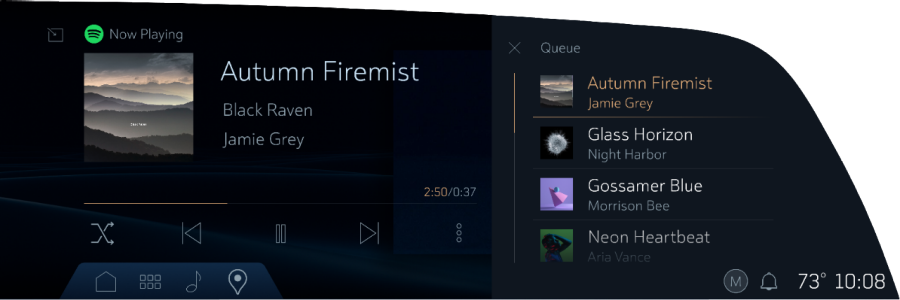
No more guessing what’s coming up next on your playlist. A new side queue helps drivers see which tracks are lined up, while a dropdown source selector lets you effortlessly switch between audio apps and sources with fewer taps. Queue view is available with supported paid music streaming subscriptions.
Your profile, your seat.
IMAGE PLACEHOLDER
Bigger touch targets.
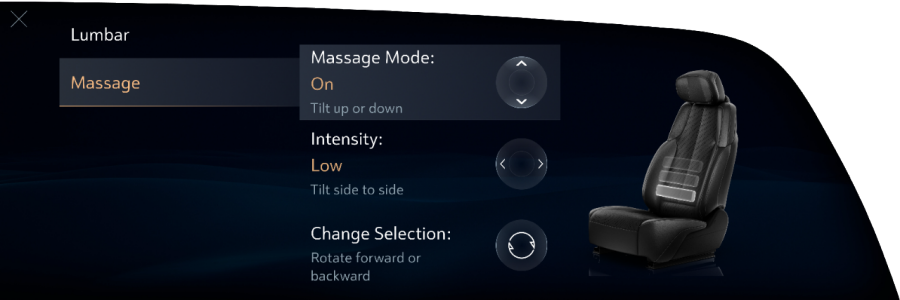
More intuitive comfort controls.
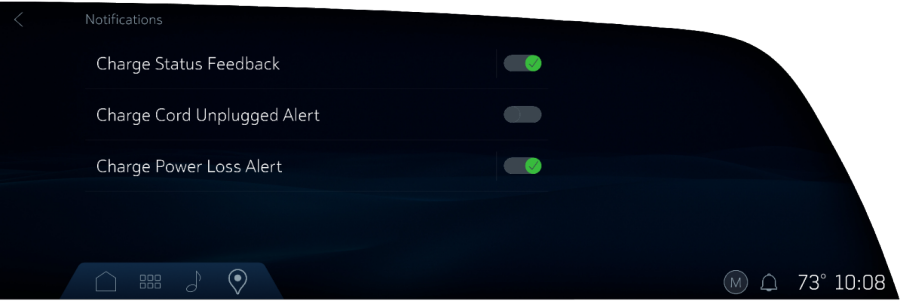
Charging notifications, simplified.
Additional updates include sharper graphics and text in the Head-Up Display (HUD) for improved readability, plus a faster Bluetooth setup with one less confirmation step.
Vehicle eligibility and rollout
We’ve begun rolling out some of the enhancements to eligible Cadillac vehicles through over-the-air updates, with additional improvements arriving over the next few months. Customers will see these changes once the latest software update becomes available for their vehicle.
Eligible Cadillac vehicles:
2025-26 LYRIQ
2025-26 OPTIQ
2025-26 VISTIQ
2025-26 CT5
Upcoming enhancements
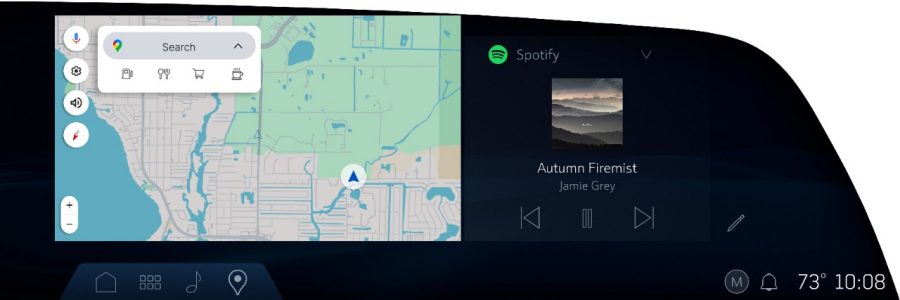
Optimizing your home screen: Planned refinements include a default split-view layout with a larger, fully interactive map, so you can search destinations, plan routes, and navigate without leaving the home screen. The enhancements are designed to create a clearer visual hierarchy between navigation and media, with greater visibility around key routing information.
This new layout will also bring a streamlined editing flow that makes it easier to personalize your screen, with one-tap access to customize both large and small widgets.
These updates reflect GM’s broader UI roadmap to continuously elevate the in-vehicle experience and deliver software improvements that customers see and feel.
GM’s latest software updates introduce a series of enhancements to Cadillac’s freeform user interface. Shaped by customer feedback, the updates span the home screen, media, digital vehicle controls and apps, making the infotainment experience even more intuitive, responsive, and easier to navigate.
What’s new:
A better way to browse and listen.
- No more guessing what’s coming up next on your playlist. A new side queue helps drivers see which tracks are lined up, while a dropdown source selector lets you effortlessly switch between audio apps and sources with fewer taps. Queue view is available with supported paid music streaming subscriptions.
Your profile, your seat.
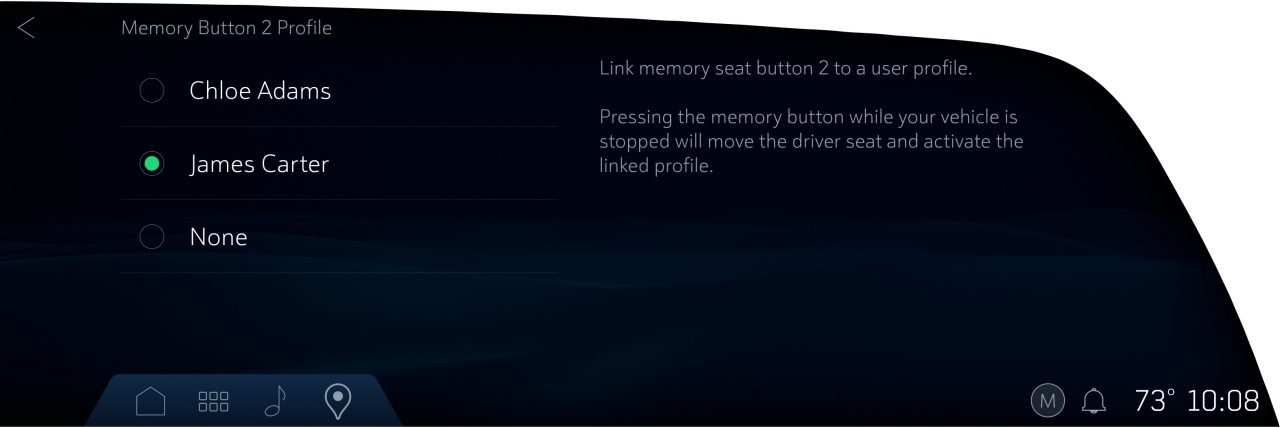
- Your personalized settings are just a tap press away after someone else drives your vehicle. You can now link up to two user profiles to your vehicle’s seat memory buttons. One press of your memory seat button restores your driver profile and preferred seat position. This update arrives first on the 2026 Cadillac VISTIQ and will expand to other GM vehicles over time.
Bigger touch targets.
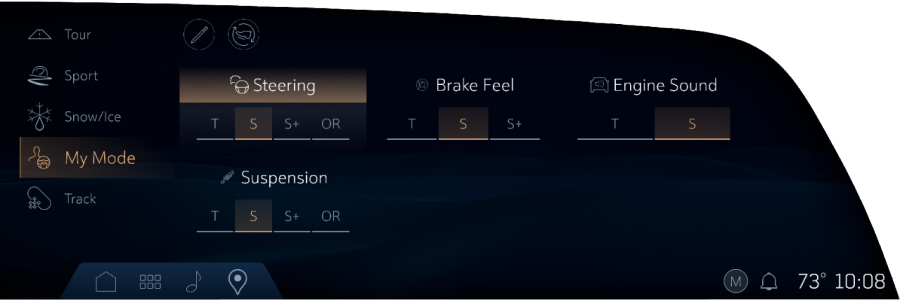
- Larger tap areas help reduce mis-taps and make it quicker to select frequently used controls — whether it’s changing drive modes or entering the Wi-Fi password when you join a new external network or hotspot.
More intuitive comfort controls.
- On-screen graphics now mirror the physical seat controls on the door, making seat adjustments more intuitive and providing a clear visual of the settings being adjusted.
Charging notifications, simplified.
- Revised labels and descriptions within the in-vehicle charging app make features easier to understand.
Additional updates include sharper graphics and text in the Head-Up Display (HUD) for improved readability, plus a faster Bluetooth setup with one less confirmation step.
Vehicle eligibility and rollout
We’ve begun rolling out some of the enhancements to eligible Cadillac vehicles through over-the-air updates, with additional improvements arriving over the next few months. Customers will see these changes once the latest software update becomes available for their vehicle.
Eligible Cadillac vehicles:
- 2025-26 LYRIQ
- 2025-26 OPTIQ
- 2025-26 VISTIQ
- 2025-26 CT5
Upcoming enhancements
- Optimizing your home screen: Planned refinements include a default split-view layout with a larger, fully interactive map, so you can search destinations, plan routes, and navigate without leaving the home screen. The enhancements are designed to create a clearer visual hierarchy between navigation and media, with greater visibility around key routing information.
This new layout will also bring a streamlined editing flow that makes it easier to personalize your screen, with one-tap access to customize both large and small widgets.
These updates reflect GM’s broader UI roadmap to continuously elevate the in-vehicle experience and deliver software improvements that customers see and feel.